Wealth Management Dashboard for New Edge
SUMMARY
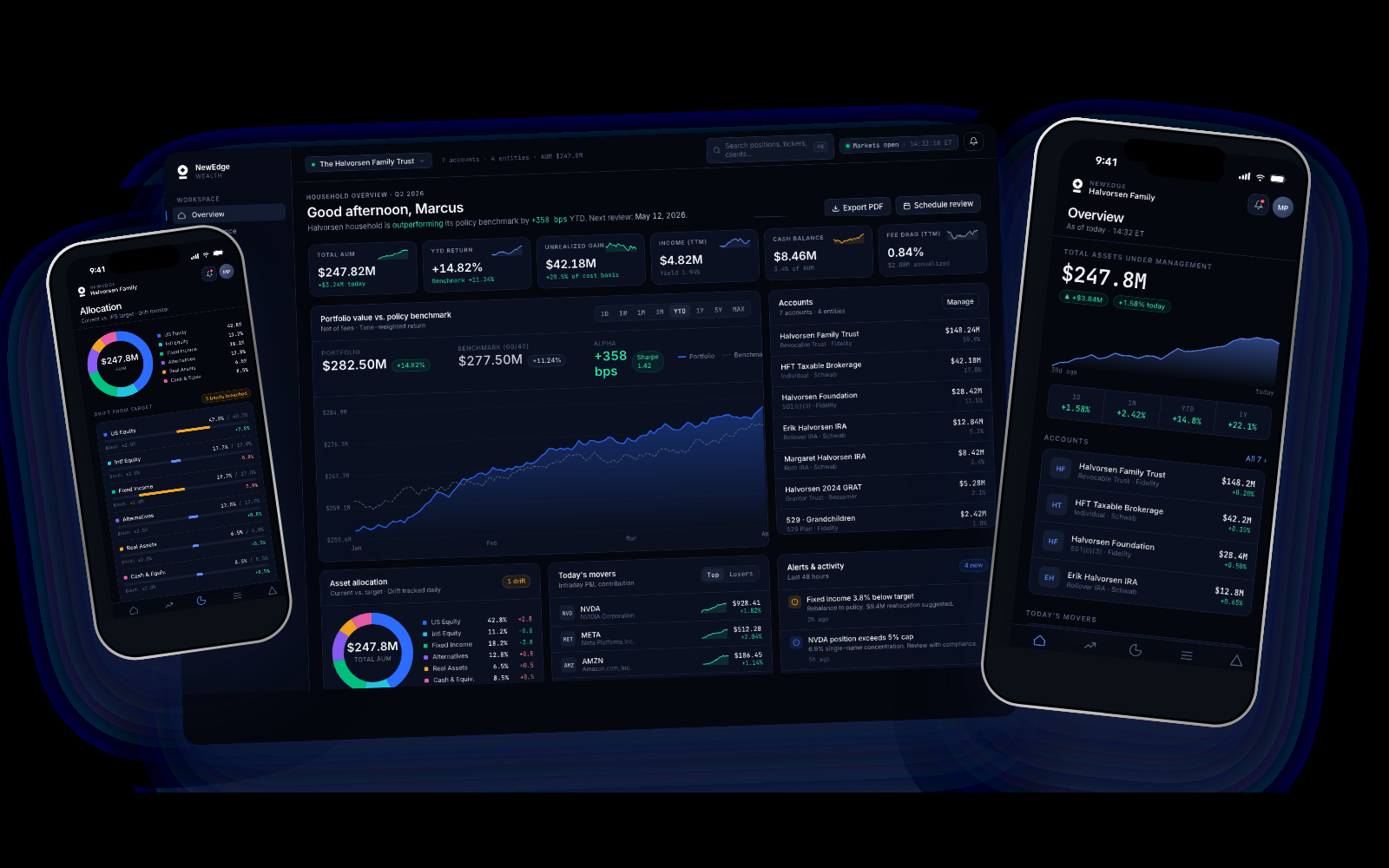
New Edge Wealth is a wealth management platform for high-net-worth households and the advisors who serve them. A dashboard already existed and it already worked: balances, allocation, cash flow, market data. My job was the refresh. Where reporting lives, how someone filters down to the accounts they care about, what earns its place on a small screen, and what the hierarchy should be once you accept that the real question is always the same one: where is my money, and is it going up or down.
Role
Product Designer
Team
1 Product Designer, 2 Product Managers, 4 Engineers
Timeline
2024 - 2025
Tools
Figma, FigJam, Figma Make
Skills Used
Dashboard design, data visualization, financial UX, responsive design, design systems, prototyping
Assets Managed
Product Surfaces
Screens Designed
Responsive
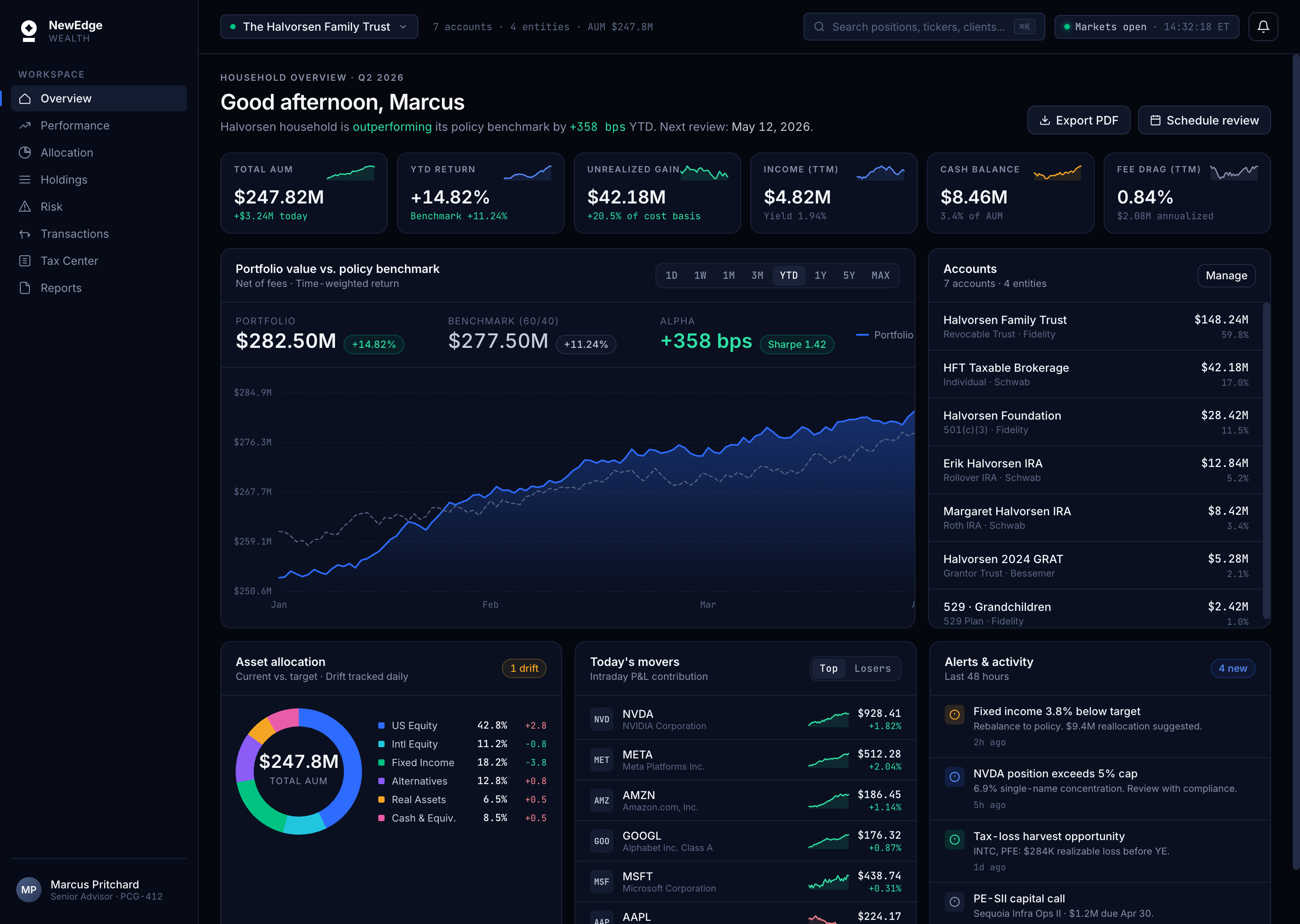
The existing dashboard showed everything at once. How might we restructure it so the headline answer comes first and the detail stays one click away?
Act 01
Listening Before Designing
Financial products come with a research problem: you cannot look at real client data, and the end client is hard to reach. So the work was getting as close as the constraints allowed, and being honest about the gap.
Research · Method
Getting close to the user without getting close to their money.
Advisor interviews
the users I could actually reach
Product audit
the dashboard already in use
Existing artifacts
reporting packets, requests, support themes
Competitor teardown
the incumbent advisor platforms
Synthetic data
demo households, no real client records
Research · Mapping
A day in the life, mapped end to end.
Morning Scan
Client Prep
Client Meeting
Rebalance
Report Out
EOD Review
Time
5 min
30 min
60 min
15 min
10 min
5 min
User Actions
Front Stage
Back Stage
Support Process
The user at the center
Designed for Marcus.
Primary persona
Marcus Reeves
Senior Wealth Advisor·Chicago, IL · Mid-size RIA
“I do half my client prep on my phone at 10pm the night before a meeting. Don't pretend I'm always at my desk.”
Experience
HNW Households
AUM
Framing · Principles
Four principles guided every decision.
Clarity over density.
Advisors wanted more data, not less. Every number earns its place through hierarchy, one headline, context, then detail on demand.
Designed for the long session.
Ten-hour days are the norm. Deep navy surfaces, restrained color, and precise contrast built for focused work, not dashboard aesthetics.
Mobile is a different job.
The real work happens at a desk. Phones get used for a quick check between other things, so mobile isn't a shrunken desktop, it's a triage view: balance, direction, and the two reports people actually open.
Precision as trust.
Financial data lives or dies on precision. Every pixel, rounded numbers, ambiguous color, blurred edges, costs or earns credibility.
Ideation · Wireframes
From low-fi flows to the full dashboard.
Primary
Advisor Flow
Frame 01 · Overview
Frame 02 · Clients
Frame 03 · Portfolio
Frame 04 · Allocation
Track
and Deliver
Frame 05 · Cash Flow
Frame 06 · Reports
Frame 07 · Client detail
Act 04
A System Before the Screens
Before polishing ten screens, I built the system they'd be assembled from. Every color, type ramp, spacing unit, and component is documented in Figma as the design source of truth, then mirrored in a live, coded Storybook so engineering builds from the exact same parts.
One source of truth, two surfaces
Design System
Buttons, inputs, cards, data tables, and chart primitives each have documented states, dark-mode variants, and accessibility notes. The payoff is a shared language: when I say *'primary button, disabled, dark'*, design and code mean exactly the same thing, which is what kept ten dense screens consistent.
Live · Storybook
The component library, running in your browser.
Browse the real Storybook — open any component, flip through its states, and see the tokens and docs behind it.
Explore the design system
Open the full system, components, tokens, and documentation, in Figma or browse the coded library in Storybook.
Act 05
Designing the Platform
What shipped is five focused product surfaces, each with a desktop workstation and an iPhone companion. Below: every screen, the decision behind it, and how the advisor flow holds together across devices.
Overview
30 seconds to household health
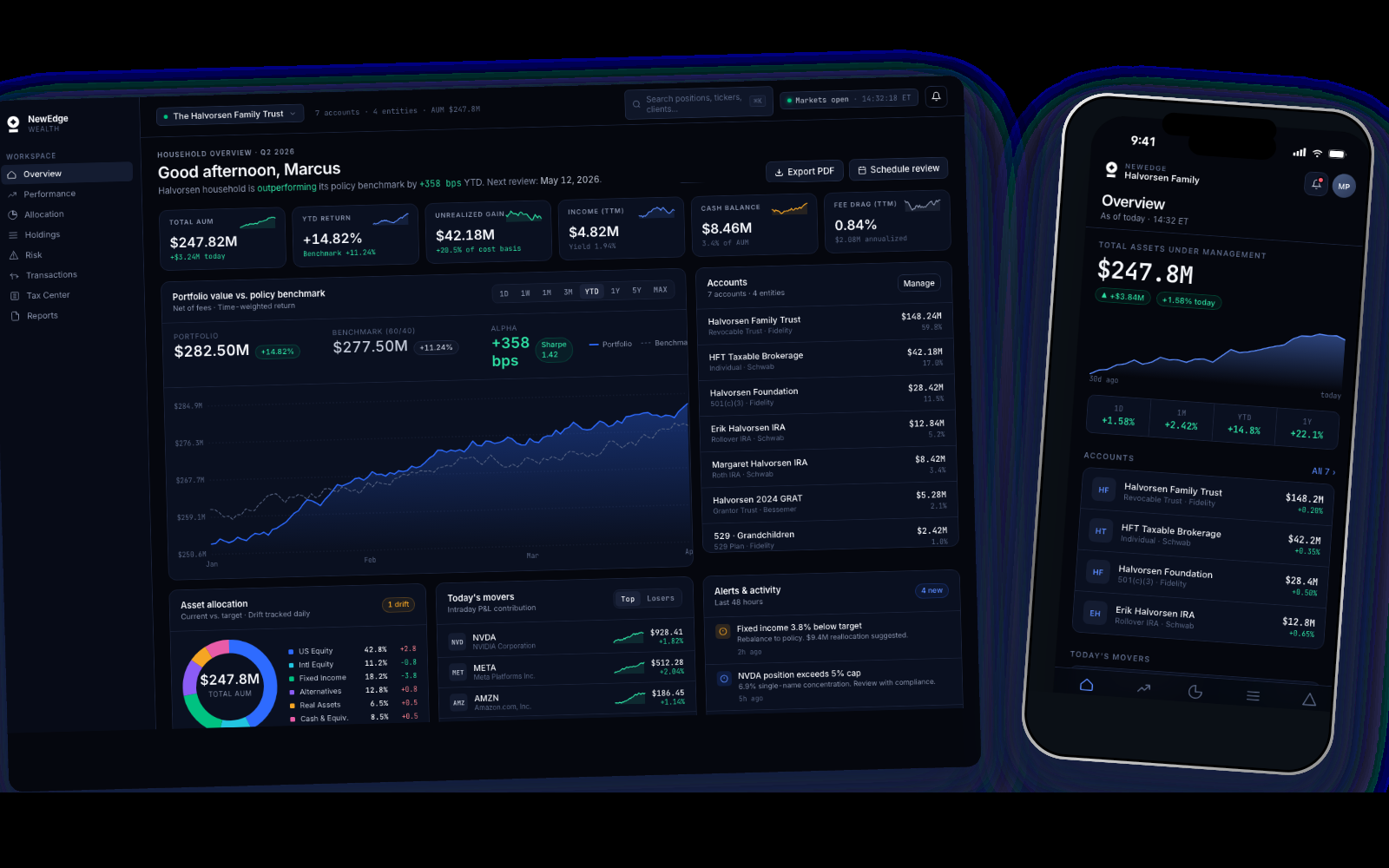
The home base. A greeting, a household-level headline (is this portfolio outperforming its policy benchmark, and by how much?), then six stat cards, Total AUM, YTD Return, Unrealized Gain, Income TTM, Cash Balance, Fee Drag, that answer the 'is everything OK?' question without scrolling. Below that, a time-weighted portfolio-vs-benchmark chart with alpha in basis points, and a live accounts list across every custodian. The old dashboard opened on six equally weighted numbers and a marketing tile. This one opens on an answer.
Why things sit where they sit.
Six cards, in that order, on purpose
Total AUM leads because it is the number people orient by. Fee Drag sits last because it matters but nobody opens the page for it. The four in the middle are the follow-up questions in the order they get asked. Six, not twelve, because a row you can take in at a glance beats a grid you have to read.
The chart is the largest object on screen
The question underneath everything is 'is it going up.' A single number answers that for today. A line answers it for the year, and shows the shape of how you got there, which is what people actually want when they are nervous. The benchmark runs as a dotted line behind it so the answer is always relative, never absolute.
Two actions, not three
The early version had Export PDF, Schedule review, and a filled Propose trade button. Propose trade was the loudest thing on the page and this platform does not execute anything, it manages and reports. Cutting it left the two actions people genuinely take after looking at a portfolio, and made the remaining choice trivial.
'+358 bps' and 'outperforming its benchmark by +358 bps' are the same fact, but only one of them tells you whether to be happy. Leading with the sentence sets the interpretation before the numbers arrive.
Performance & Attribution
Not just *what* returned, but *why*
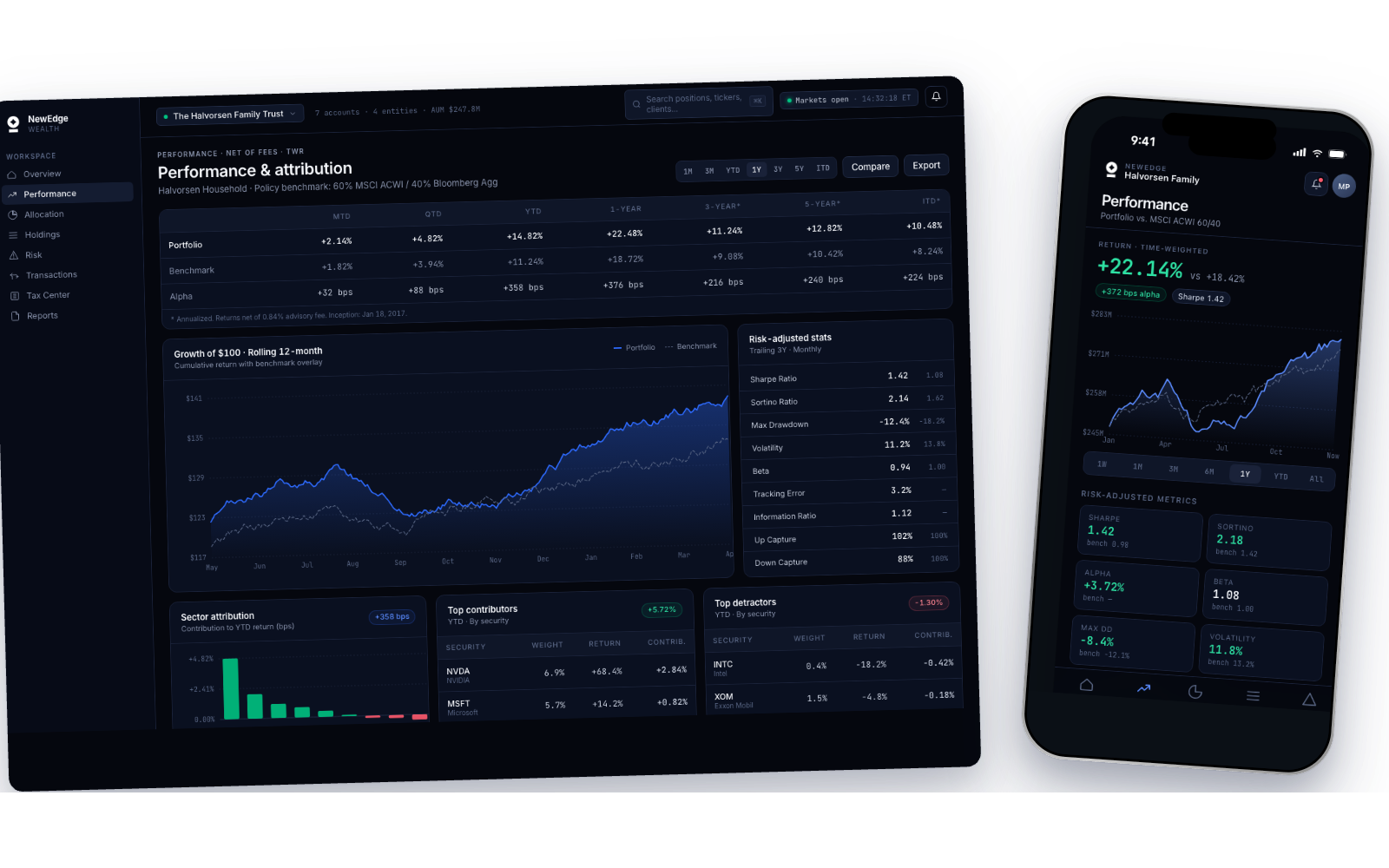
Advisors don't just report returns, they explain them. This surface plots growth of $1 against a configurable benchmark (MSCI ACWI, 60/40, custom), with every period return broken out by contribution and selection effect. Risk-adjusted metrics sit to the right, Sharpe, Sortino, Alpha, Beta, Max Drawdown, Volatility, Information Ratio, so an advisor can pull the full story in one glance. Sector attribution and contributor/detractor ranking anchor the bottom: which three positions earned the quarter, which three cost it.
WHY A SOLID LINE VS A DASHED ONE
The portfolio line is a filled gradient; the benchmark is a dashed line. One visual weight rule carries the full meaning, *the solid thing is yours, the dashed thing is the market.* Advisors read the shape of the gap instinctively, without a legend lookup.
The chart is the largest object on the page because the shape of a year is what people carry out of a meeting. They forget the exact return figure and remember whether the line climbed steadily or lurched.
Allocation & Drift
Current vs target, tracked daily
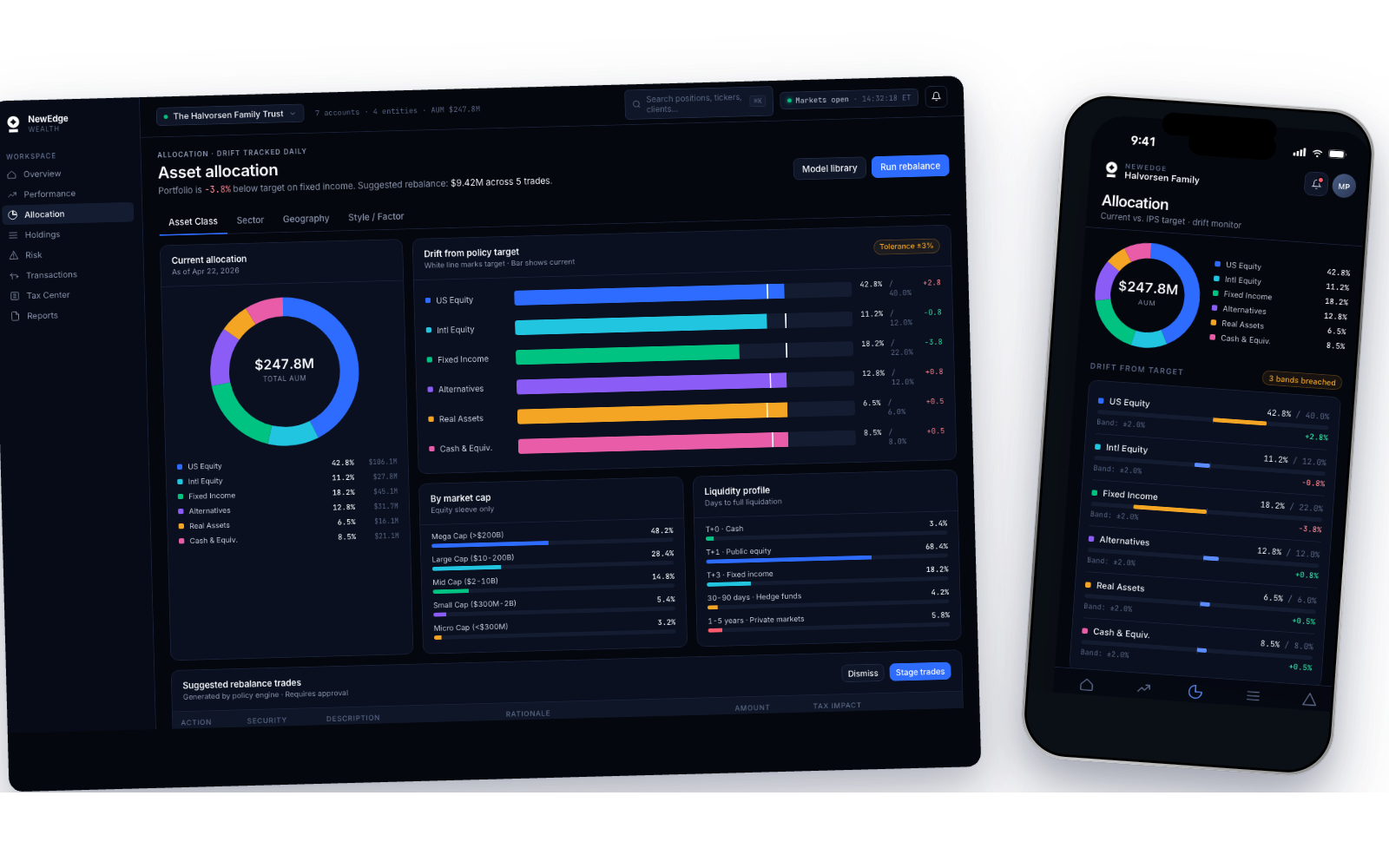
A dual-lens view of asset allocation. The donut answers *what do I own right now?*; the drift bars answer *how far off policy am I, and where?*. White tick marks on each bar show the IPS target; the filled bar shows current position, and color shifts to amber when drift exceeds the tolerance band. The header surfaces the portfolio's most breached sleeve (*'Fixed Income is -3.8% below target'*) and a concrete next step (*'Suggested rebalance: $9.42M across 5 trades'*). Tabs drill into Sector, Geography, and Style/Factor views without leaving the page.
Holdings
Density, without the spreadsheet tax
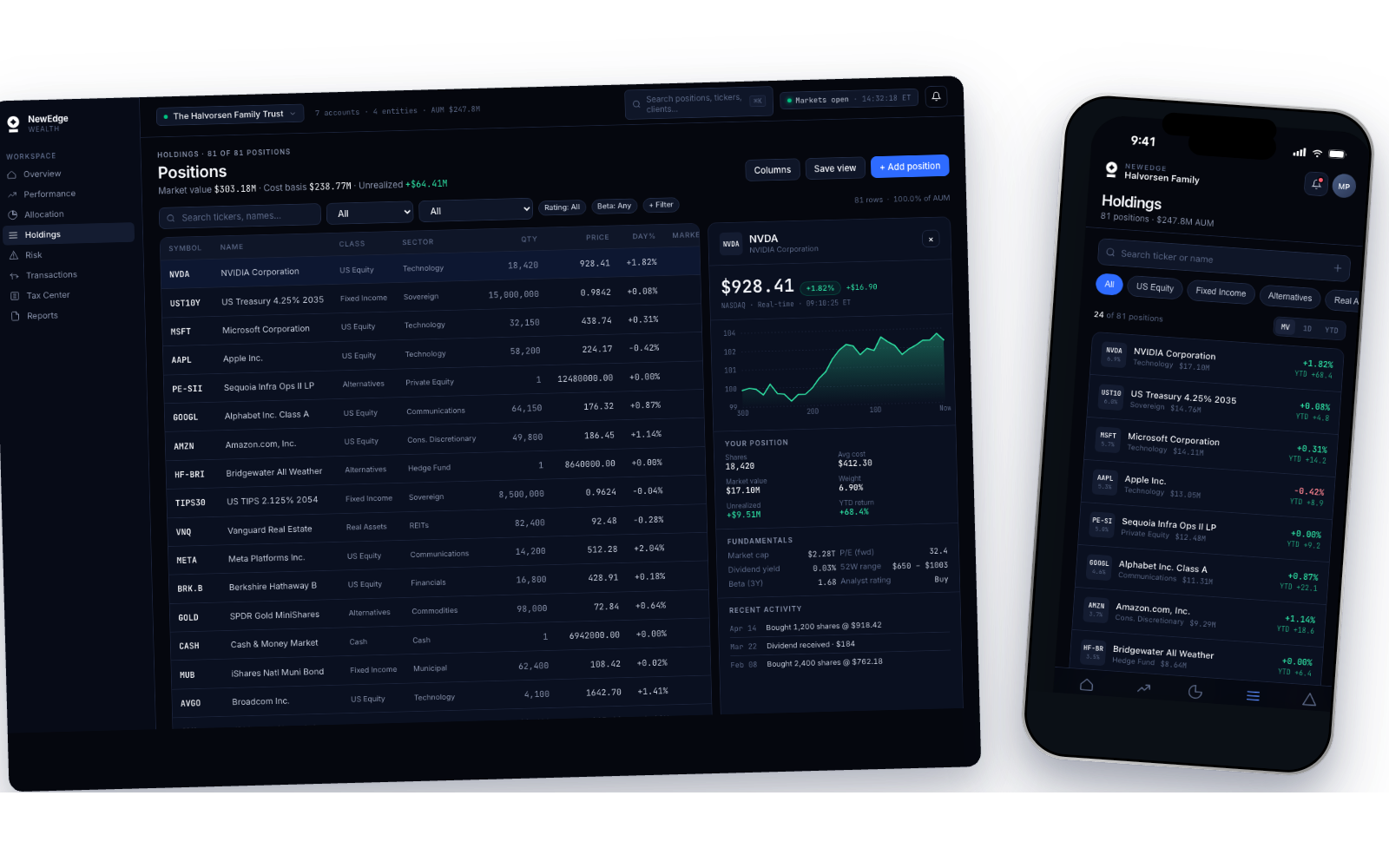
The screen that replaced Excel. 81 positions across equities, fixed income, alternatives, and real assets, every row showing ticker, sector, value, weight, cost basis, day-move, YTD, and drift. Click any row and the right-side panel slides in: position sparkline, full cost-basis breakdown, tax lots, recent buys and sells. Search and sticky asset-class filters live at the top, so the table narrows as fast as the advisor can think.
WHY THE TABLE FEELS QUIET
Dense tables fail when every cell screams. Here, only the numbers that matter for the current task have full weight, everything else drops to a secondary text color. Advisors scan 80+ rows in seconds because the typography does the filtering, not their eyes.
Risk Analytics
VaR, factor exposure, scenario testing
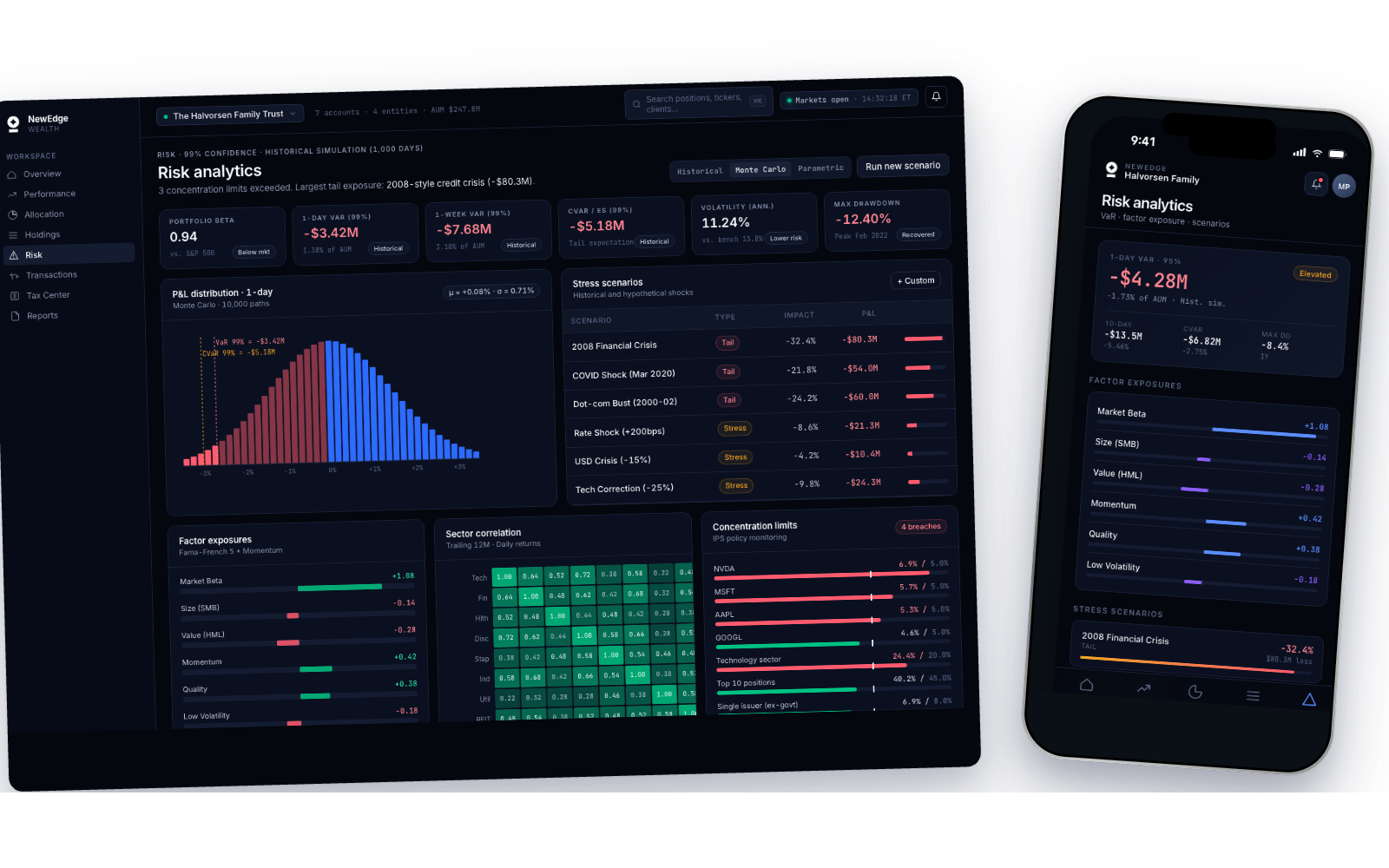
The surface advisors pull up when a client asks *'what happens if things go bad?'*. 1-day 95% VaR and CVaR sit front and center, with the P&L distribution (1,000 Monte Carlo iterations) rendered as a histogram, losses shaded red, gains green, the VaR line marked explicitly. Factor exposures (Market Beta, Size, Value, Momentum, Quality, Low Volatility) show how the portfolio is tilted. Stress scenarios replay 2008, COVID, 2022 rate shock, and dot-com crash against the current book, so an advisor can answer the bad-year question with numbers, not a shrug.
Act 06
Reflections
The header had a filled Propose trade button, which told everyone this was a tool that places trades. It isn't. It manages and reports. A primary button is the strongest promise an interface makes, and that one was promising the wrong product before anyone had read a single number.
Reflections
What I Learned
RESEARCH IS THE DESIGN
The three concepts I killed weren't wasted, they were the research. You can't reject 'the spreadsheet grid' until you've designed it and watched a real advisor struggle with it.
MOBILE IS A DIFFERENT QUESTION
The instinct is to make the phone a smaller desktop. But nobody does a portfolio review on a phone, they check. Once I stopped trying to fit everything and asked what a thirty second glance actually needs, the mobile IA fell out of that answer instead of out of the desktop layout.
DARK MODE IS UX, NOT AESTHETIC
In a professional tool used for ten hours a day, dark mode isn't a stylistic choice, it's a workflow choice. Deep navy surfaces, restrained color, and tight contrast discipline aren't what the product *looks* like, they're how it *performs* in the sessions that matter.
TRUST IS VISUAL
The single biggest lesson: in a tool where people bet their clients' retirement, every pixel reinforces or erodes trust. Rounded numbers, blurred edges, or ambiguous color, all of it costs you. Precision in visuals is precision in promise.