← Back

Wealth Management Dashboard for NewEdge

EnterpriseData Visualization Design SystemResponsive Dark ModeFintech

Summary

NewEdge Wealth is a client portal. Clients log in to see their accounts, balances, asset allocation and cash flow. The dashboard held a lot of data but gave no order to read it in. I gave it a modern visual refresh and reorganized the information so the numbers are easy to read and the reports are easy to find. Three screens, desktop and responsive mobile, built on one design system.
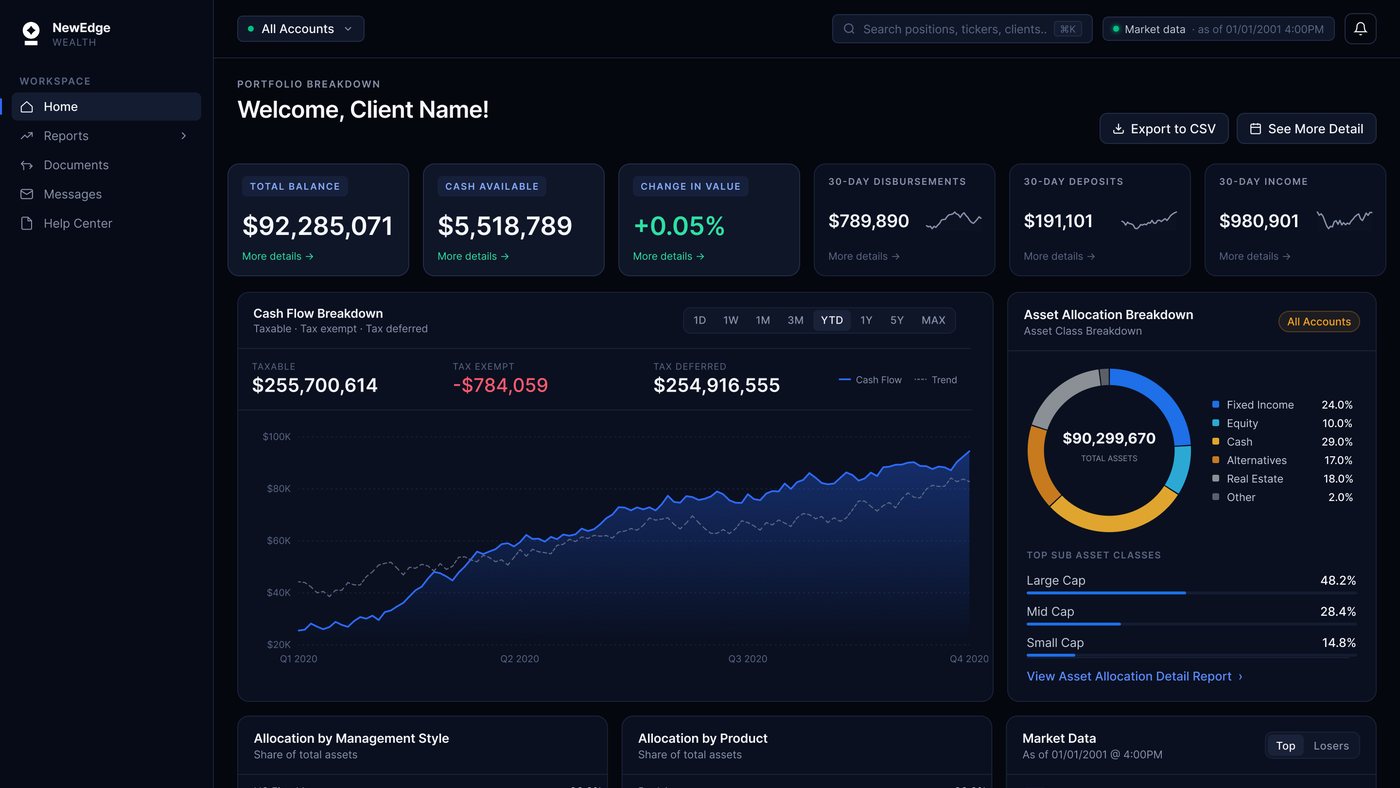
NewEdge Wealth client portal on desktop
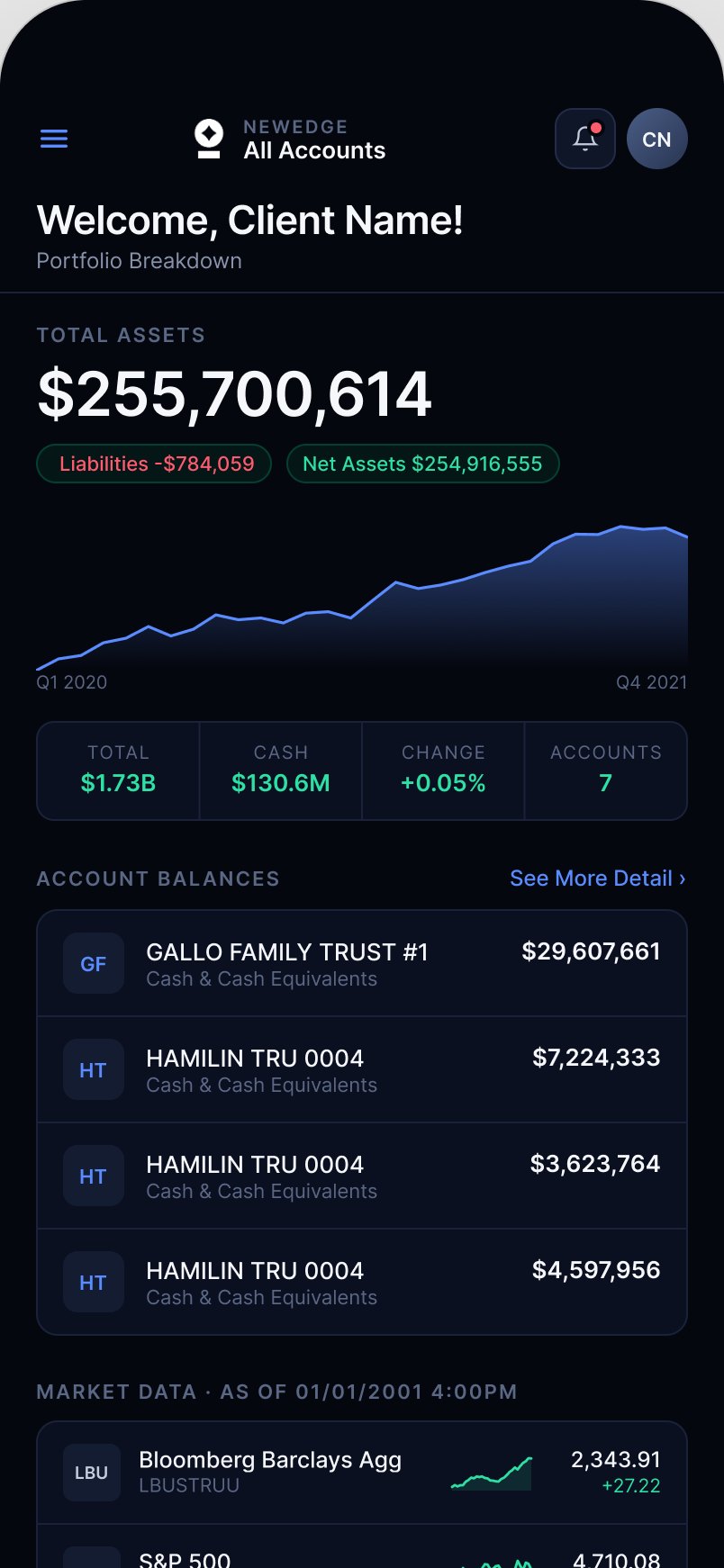
The same portal on mobile

Role

Product Designer

Team

1 product designer, 1 product manager, 3 engineers

Timeline

2024 to 2025

Tools

Figma, Storybook

Skills used

Design systems, data visualization, information hierarchy, responsive and mobile design, dark mode and contrast, prototyping, engineering handoff
Part 01

Problem

The problem

An outdated design, and too much data to take in.

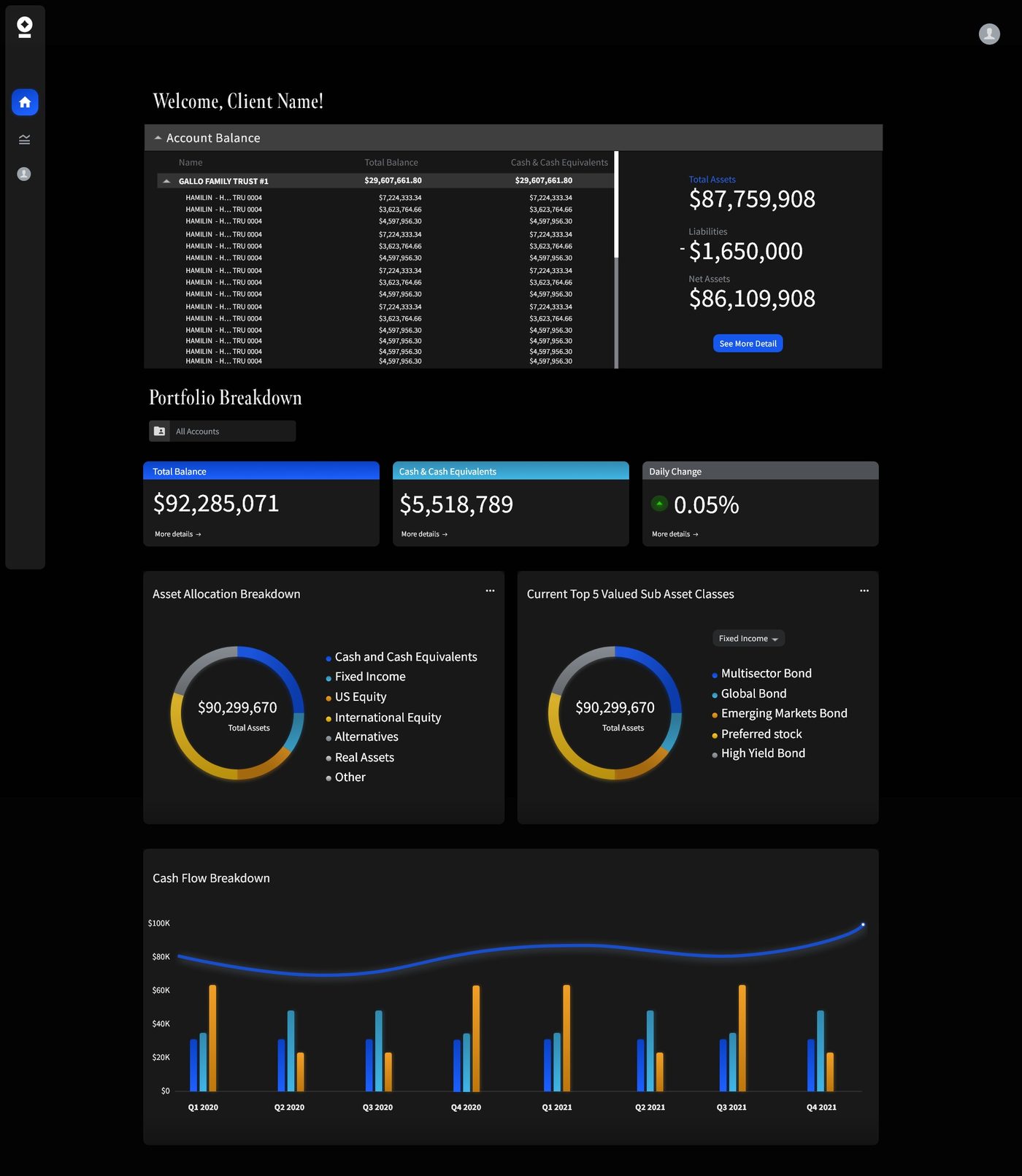
The dashboard held a lot of data and gave clients no way to digest it. The visual language was dated, every figure carried the same weight, and finding a number meant reading the whole page. It needed cleaning up and bringing up to date.

The old screen

What made it hard to read.

BeforeThe client portal
The NewEdge client portal before the redesign
  • Account names truncateFifteen rows reading "HAMILIN - H… TRU 0004" in a fixed scroll window. Nothing tells one account from another.
  • Color with no meaningThree summary cards, three different header colors, the same kind of number behind each.
  • No hierarchyHeadings, totals and supporting figures share a weight, so nothing says where to start.
  • Information overloadTen blocks of data competing on one screen. Nothing recedes, so everything has to be read before anything can be found.

Goals

Where it had to land.

01

Headline first

Balances, then the charts that explain them, then market data.

02

Reporting one click away

Every figure links into the report behind it.

03

One visual system

One ramp, one type scale, one set of components.

04

Format the data for mobile

Work out how data-heavy reports display in one column, and decide what belongs on a phone versus what stays desktop only.

Part 02

Research

How I worked

Advisor feedback, then mock data to test against.

Advisors sit with clients in this portal every week, so they were the fastest route to what people actually ask for. I built the screens on mock client accounts and tested them with advisors and the internal team.

Talk to advisors

The people who walk clients through this portal every week, and hear the same questions over and over.

Audit and compare

Every screen in the live portal, then a teardown of other wealth portals for the conventions clients already read.

Test on mock data

Mock client accounts built to the shape of a real one, so advisors and the internal team reviewed the screens at true density.

Principles

Four rules I set.

Keep the data, add hierarchy

Clients ask for more numbers, not fewer. So the fix was giving them an order to be read in, not a shorter page.

Dark mode stays

The portal was already dark, so keeping it dark meant nothing to relearn. A dark surface also lets the six data colors read clearly without a bright background competing with them.

Mobile gets its own layout

Phones get used for a quick check, so the mobile screens are built from what that check needs rather than from what happens to fit.

Numbers have to be exact

People are looking at their own money. Rounded figures, columns that shift as values change, and a color that could mean two things all cost trust.

Part 03

Solution

Before and after

BeforeThe client portal
The NewEdge client portal before the redesign
AfterThe redesign
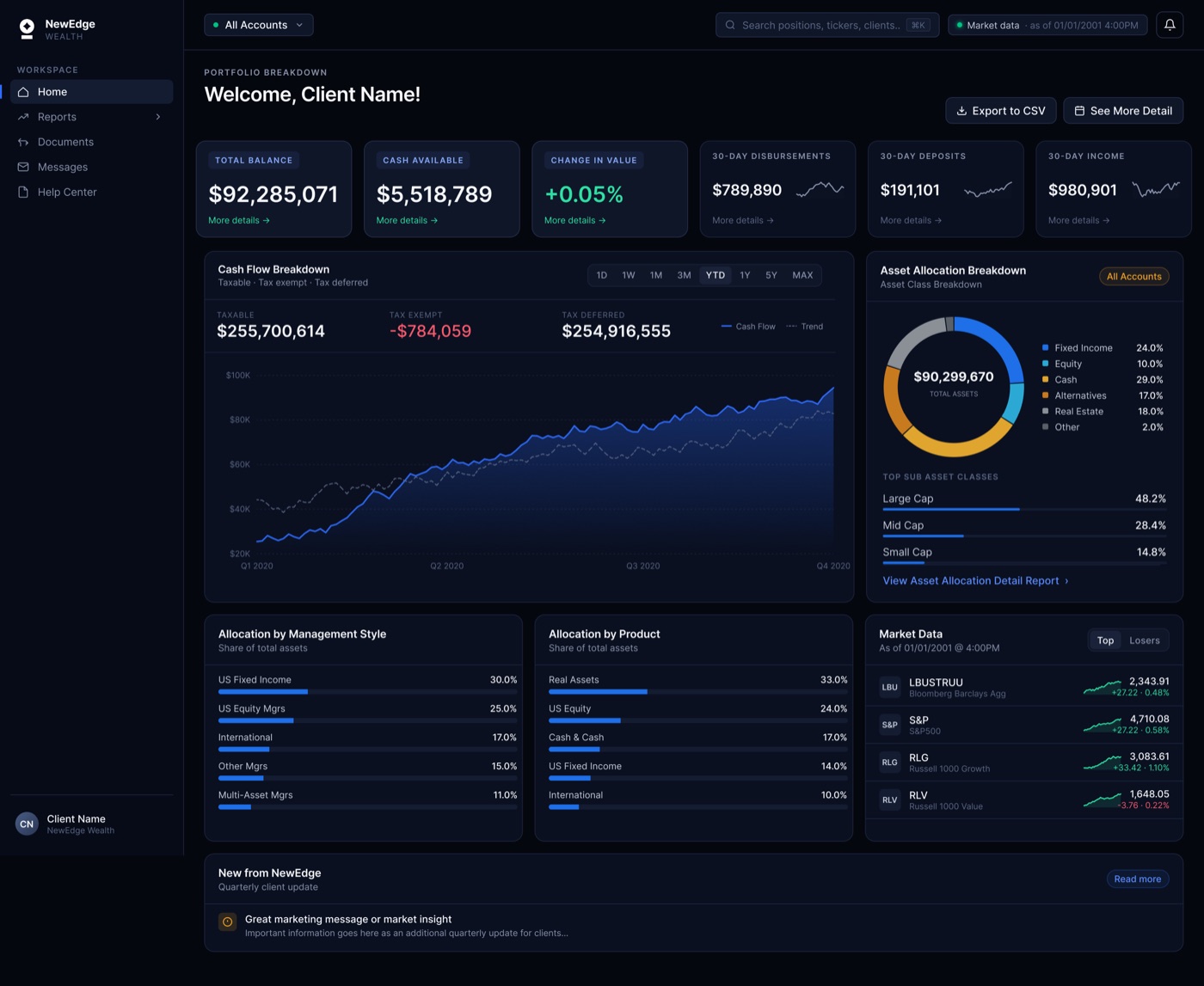
The redesigned NewEdge home page

Home

Hierarchy.

portal.newedgewealth.com
NewEdge client portal home, full page

↑ Scroll the frame to see the full page.

  • Six figures, in a set orderTotal balance first because it is what people orient by. The thirty-day flows last because they matter but nobody opens the page for them.
  • One chart, not three ringsThe original showed three donuts with almost identical splits. One carries the headline allocation, the other two became ranked bars you can actually compare.
  • Every block ends in a way outEach card links into the report behind it, so the home page is a summary rather than a destination.
  • Market data sits lowReal, but not the first read. It was competing with the balances in the original.
  • The marketing tile staysIt is how the firm talks to clients quarterly. Moving it to a full width banner kept it without letting it interrupt the numbers.
  • Two tiers, not six equal cardsTotal balance, cash available and daily change sit larger on a lifted surface. The three thirty-day figures drop back, so the row has a first read and a second.

Navigation

Navigation.

The old menu had one "Reports" item and no sign of what was inside it.

On the home page

  • Reports sits collapsed with a disclosure chevron.
  • The list stays out of the way while you read the summary.

Inside a report

  • Reports is open, with Asset Allocation, Cash Flow and Holdings under it.
  • The one you are reading is highlighted, so the sidebar answers "where am I".

The two reports

The two reports.

"What do I own?"

Asset Allocation Detail Report

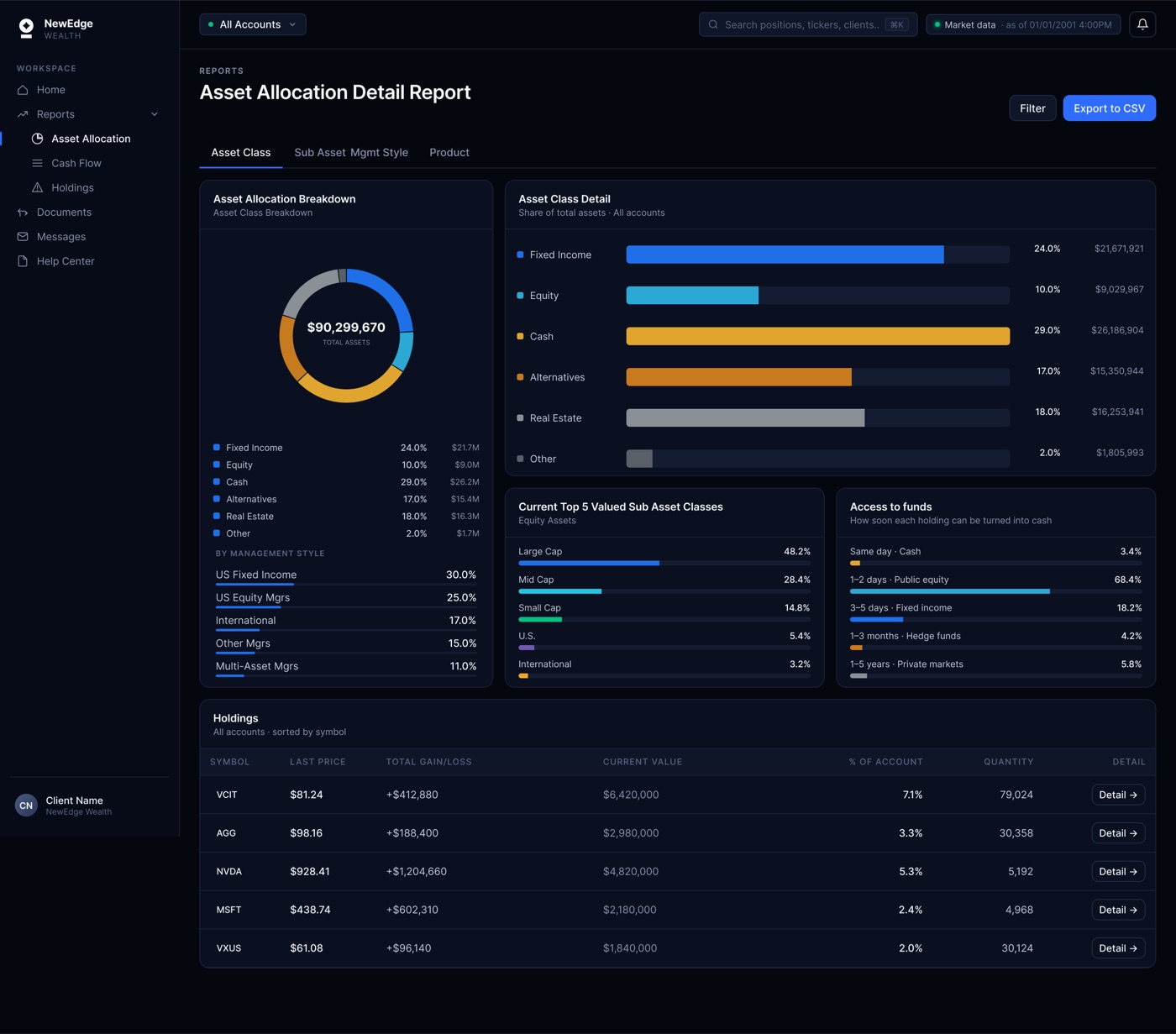
The allocation ring carries percentage and value in its legend, and the panel beside it repeats the same six classes as bars so the small slices stay readable. One color means one asset class on the whole screen. Tabs move between asset class, management style and product.

Asset Allocation Detail Report

"What came in and what went out?"

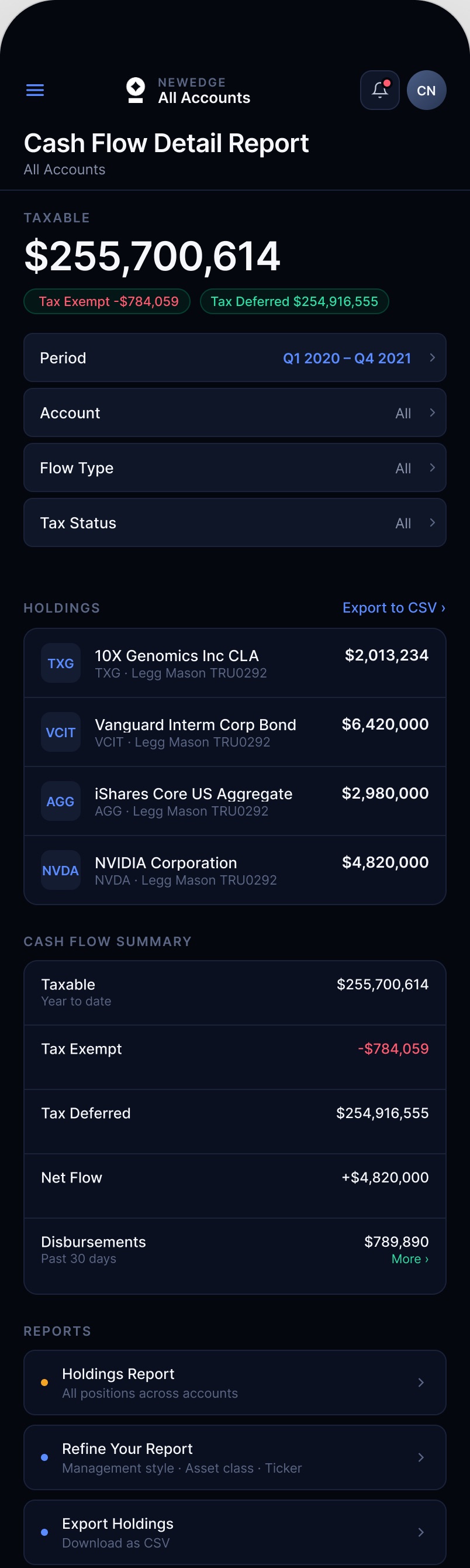
Cash Flow Detail Report

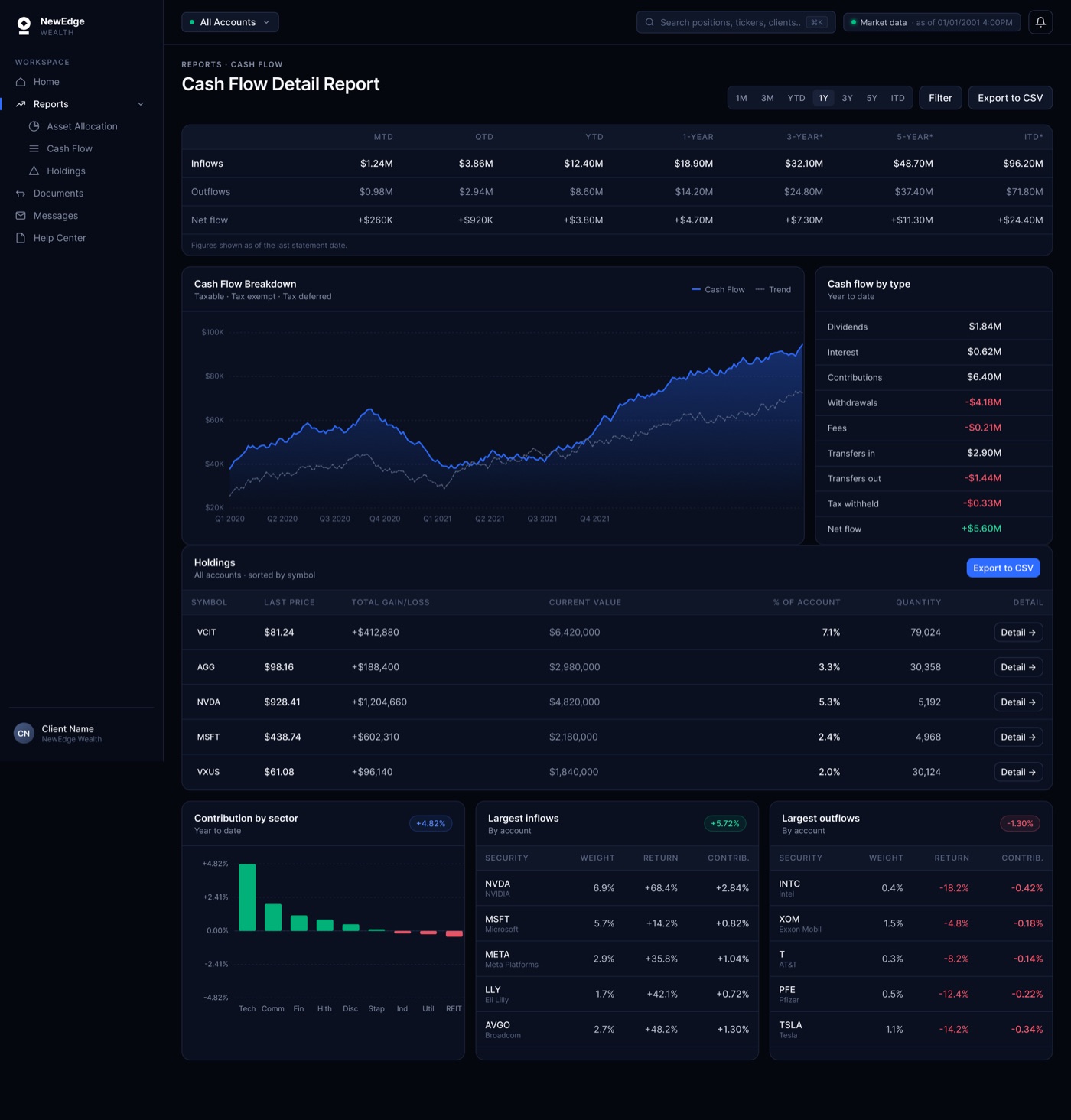
Inflows, outflows and net flow across every period, the cash flow chart over eight quarters, then the same holdings table. Contribution by sector and the largest inflows and outflows sit at the bottom, so the biggest movements are named instead of hunted for.

Cash Flow Detail Report

Detail decisions

Reading a dense table.

Table

  • Numbers right aligned with tabular figures, so a column scans straight down.
  • A one pixel divider between rows instead of banding, which keeps a long list quiet.
  • Row height set so about twelve positions fit before a scroll.

Type

  • Two steps only in a data block: a small uppercase label and the value.
  • Supporting figures, like a target or a change, sit smaller and muted under the value.
  • Value sizes split into two tiers so the primary numbers lead the row.

Decisions

Visual system.

TypeInter throughout, with tabular numerals on every figure so columns hold their position and a changing value does not shift the row. Five sizes only, from 10px labels to the 34px headline.
ColorOne thirteen step navy ramp replaced the ad hoc grays and the blue, cyan and gray card headers. Color now means direction or state: green up, red down, amber for a warning, blue for the current item.
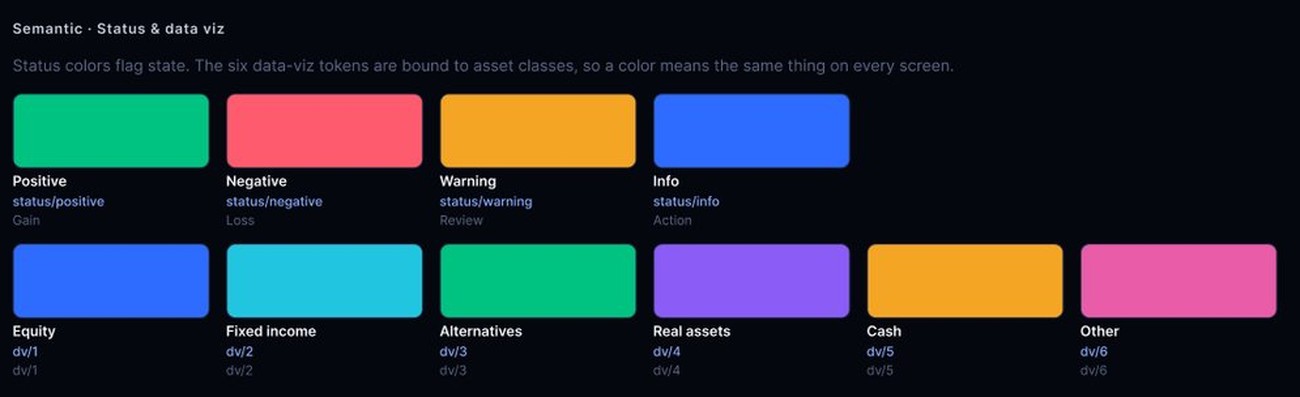
Data colorA six color set for allocation, fixed in order so the same asset class is the same color on every screen and in both charts and legends.
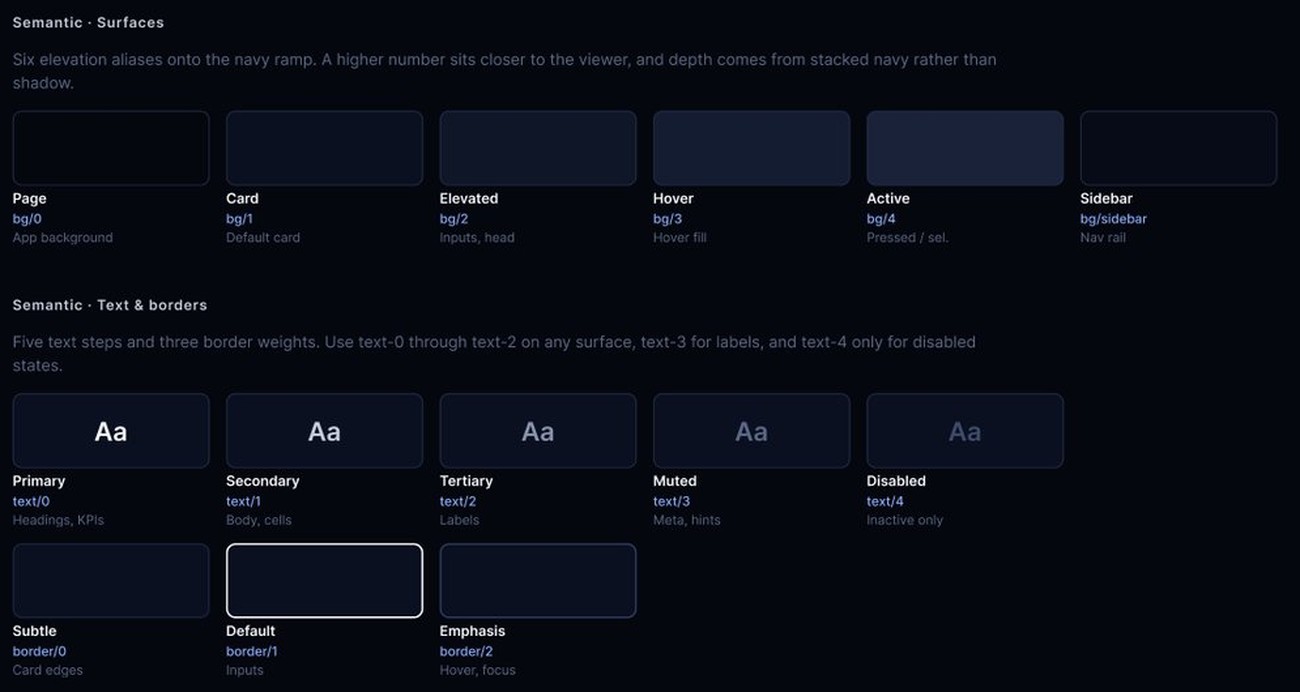
CardsOne radius and one border weight across the page, with two surface levels used only to separate primary figures from supporting ones. The original had three unrelated card treatments on a single screen.
SpacingAn eight point grid, with 24px gutters between panels and 16px inside them, so the three column layout holds at every breakpoint.
ContrastEvery text and data color checked against the dark surfaces for WCAG AA, including the chart palette, which is where dark themes usually fail.
ChartsThe three near identical donuts became one ring plus two ranked bar lists, because three rings of the same shape cannot be compared.

Part 04

Mobile

The problem

Reformatting data-heavy reports for one column.

A seven-column table and a three-panel dashboard cannot survive a phone screen intact. The work was deciding what each screen still has to answer on a phone, what gets reformatted, and what stays desktop only.

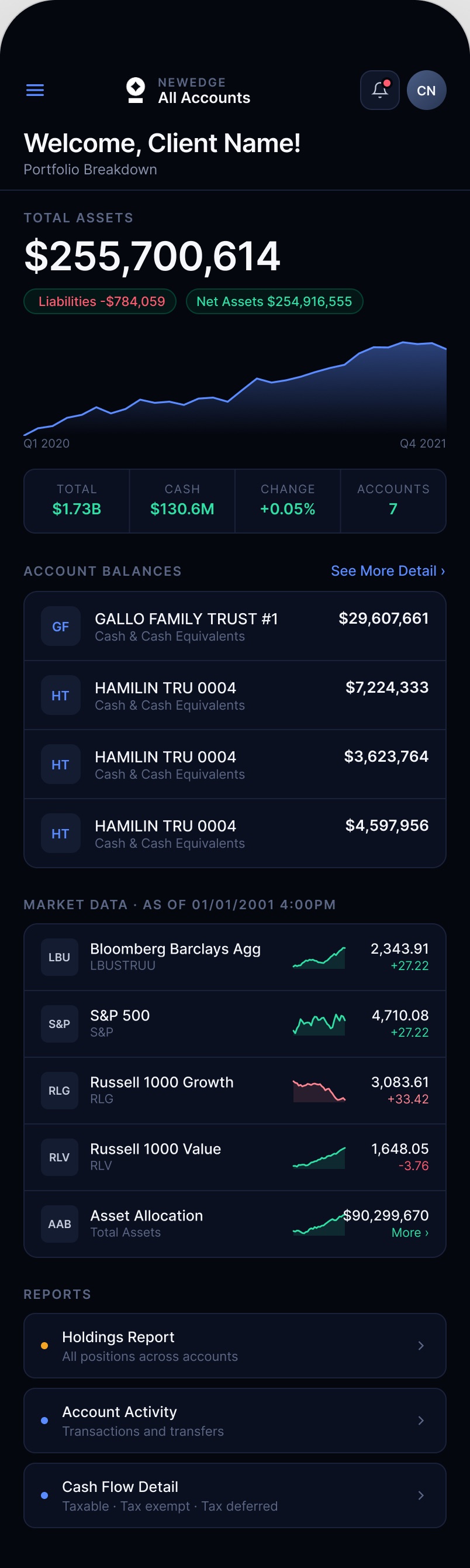
Client portal home on mobile

Home. Balances, accounts, market data. Scroll the phones.

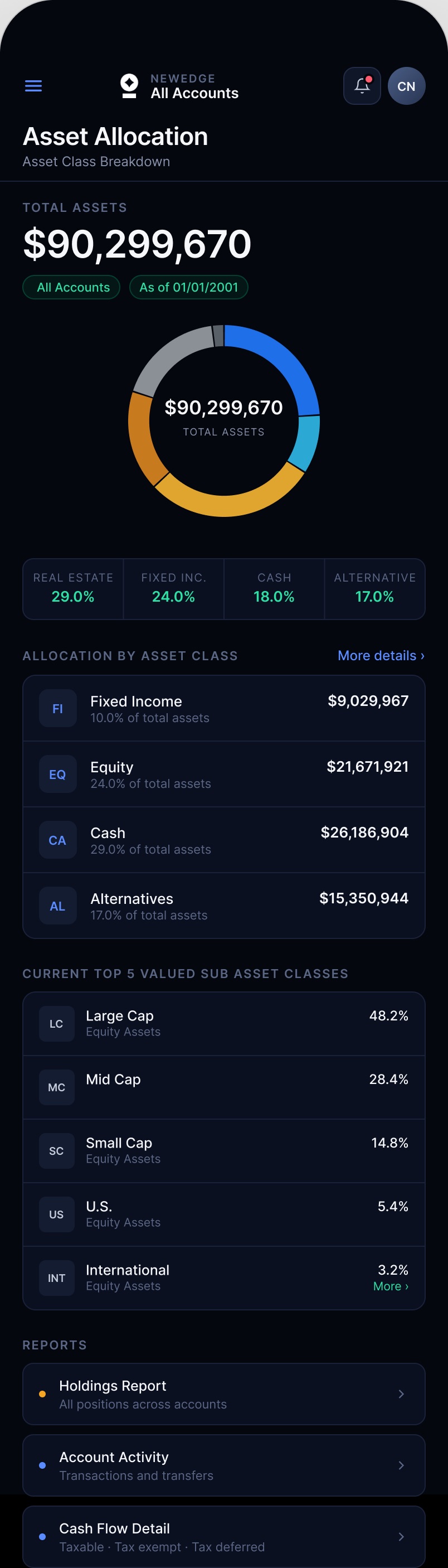
Asset allocation on mobile

Asset allocation. Ring, then the classes ranked.

Cash flow on mobile

Cash flow. Filters, then the detail.

What changed

Small screen decisions.

  • One figure leads, the rest become chipsTotal assets takes the headline. Liabilities and net assets sit under it as chips rather than competing cards.
  • Each screen opens on something differentHome a trend line, allocation a ring, cash flow the filters. Screens that share a layout still need to be told apart at a glance.
  • Seven columns become four fieldsThe desktop table carries symbol, price, gain, value, weight, quantity and a link. On a phone a row keeps the four that decide whether to open it.
  • Filters sit above the tableThe list is long on a phone, so narrowing it comes first rather than sitting behind an icon.
  • Some things stay desktop onlyThe seven-column holdings table and the seven-period cash flow matrix are desk work. On a phone they become one card per position and a single period, with the full view behind Export.
  • A hamburger, not a tab barA bottom tab bar belongs to native apps. This is a responsive site, so it uses the web pattern.

Part 05

System and impact

Design system

Tokens, then screens.

Data and status tokens

Six data tokens tied to asset classes. Equity is the same blue in the ring, legend and bars.

Surface and text tokens

Six surfaces, five text steps, one navy ramp. Depth from stacked navy, not shadow.

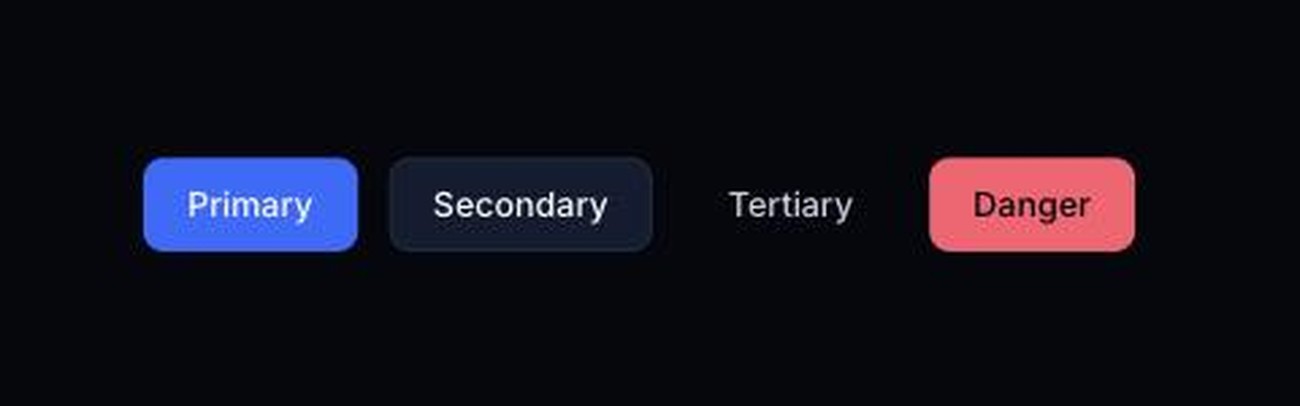
Button variants

Eight components in Storybook with their states. Engineering builds from these.

What I learned

Four things I took from it.

Research is the design

The layouts I killed were not wasted. You cannot reject an arrangement until you have built it and looked at it at full density.

Mobile is a different question

Asking what fits gives you a shrunken desktop. Asking what a quick check needs gives you a structure.

Dark mode is UX, not aesthetic

Deep navy, restrained color and tight contrast are not what the product looks like. They are how it reads when the data gets heavy.

Trust is visual

People are looking at their own money. Rounded figures, misaligned columns and ambiguous color all cost credibility, so tabular numerals were a trust decision before a layout one.